Computing
“Technology is best when it brings people together.”
Matt Mullenweg, Social Media Entrepreneur
Intent
In line with the 2014 National Curriculum for Computing, our aim is to provide a high-quality computing education which equips children to use computational thinking and creativity to understand and change the world. The curriculum will teach children key knowledge about how computers and computer systems work, and how they are designed and programmed. Children will have the opportunity to gain an understanding of computational systems of all kinds, whether or not they include computers.
Children will gain key knowledge and skills in the three main areas of the computing curriculum: computer science (programming and understanding how digital systems work), information technology (using computer systems to store, retrieve and send information) and digital literacy (evaluating digital content and using technology safely and respectfully). The objectives within each strand support the development of learning across the key stages, ensuring a solid grounding for future learning and beyond.
In regards to online safety, GDPR will play an important role in allowing children to recognise what information is personal to them and who and when it is safe to share it. To do this effectively, children must have a clear understanding of the meaning of personal information and recognise their own responsibility in safeguarding this. Children will be taught about their digital footprint and where to seek support and advice should they need it. We believe a strong understanding of these things will enable children to access modern technologies and communicate effectively whilst developing an ever increasing understanding of how to keep themselves safe from evolving dangers in the digital world.
Implementation
At Peel Common Primary School, knowledge and skills are mapped across each topic and year group to ensure systematic progression. The implementation of the curriculum ensures a balanced coverage of computer science, information technology and digital literacy. The children will have experiences of all three strands in each year group, but the subject knowledge imparted becomes increasingly specific and in depth, with more complex skills being taught, thus ensuring that learning is built upon.
A variety digital devices will are used to support the curriculum when appropriate. The range of programs and apps children access throughout their time in the school allow them to build a bank of resources to support them in developing their learning and expressing their creativity. In addition, specific lessons relating to online safety, GDPR and personal information are taught to the children. GDPR is a key priority with children being taught what we mean by personal information, who should have access to it and how to keep it safe. Children are introduced to safe passwords, safe communication and what to do if they feel unsafe. Cross-curricular links will be made where appropriate so children can apply and embed the skills they have learnt in a purposeful context.
Impact
We ensure children will:
- understand and apply the fundamental principles and concepts of computer science, including abstraction, logic, algorithms and data representation
- analyse problems in computational terms, and have repeated practical experience of writing computer programs in order to solve such problems
- evaluate and apply information technology, including new or unfamiliar technologies, analytically to solve problems
- be responsible, competent, confident and creative users of information and communication technology
Children will have developed the knowledge, skills and understanding to help them access and use a range of technology in a safe and creative way. Children will have developed skills that equip them to use computational thinking and creativity to understand and change the world. Children’s skills will have progressed to enable them to not only have met the requirements of the National Curriculum but to also enjoy using technology to develop knowledge and ideas as well as express themselves safely and creatively as responsible citizens.
Computing Curriculum 2025 - 2026
|
By the end of their time at Peel Common School our Year 6 children will:
|
|
Our Ultimate End Goal: |
|
National Curriculum Coverage |
|
EYFS |
|
Understanding the World
|
|
Key Stage 1 |
|
|
Key Stage 2 |
|
|
Our school uses the Department for Education’s ‘Teach Computing Curriculum for KS1 & 2’ (https://teachcomputing.org/) and Barefoot Computing for EYFS. Teacher’s use the ‘Teach Computing’ lesson plans to inform their computing planning and meet the needs of the pupils in their class. Lessons have clear learning objectives and key vocabulary is identified. Every lesson includes formative assessment. Summative assessment opportunities are built in across the year. It is a progressive learning curriculum with a recommended, but not prescriptive, teaching order. The units for key stage 1 & 2 are based on a spiral curriculum. This means that each of the themes is revisited regularly (at least once in each year group), and pupils revisit each theme through a new unit that consolidates and builds on prior learning within that theme. This style of curriculum design reduces the amount of knowledge lost through forgetting, as topics are revisited yearly. It also ensures that connections are made even if different teachers are teaching the units within a theme in consecutive years. |
The Teach Computing Curriculum has been developed by the National Centre for Computing Education’s (NCCE). All learning outcomes can be described through a high level taxonomy of ten strands, ordered alphabetically as follows:
• Algorithms — Be able to comprehend, design, create, and evaluate algorithms
• Computer networks — Understand how networks can be used to retrieve and share information, and how they come with associated risks
• Computer systems — Understand what a computer is, and how its constituent parts function together as a whole
• Creating media — Select and create a range of media including text, images, sounds, and video
• Data and information — Understand how data is stored, organised, and used to represent real-world artefacts and scenarios
• Design and development — Understand the activities involved in planning, creating, and evaluating computing artefacts
• Effective use of tools — Use software tools to support computing work
• Impact of technology — Understand how individuals, systems, and society as a whole interact with computer systems
• Programming — Create software to allow computers to solve problems
• Safety and security — Understand risks when using technology, and how to protect individuals and systems
Overview of Dependencies within the ‘Teach Computing Curriculum’ and our Curriculum Design:
|
|
No Dependencies |
Dependencies |
|
|
Year 1 / 2 |
Year 1 |
|
|
|
Year 2 |
|
|
|
|
|
No Dependencies |
Dependencies |
|
|
Year 3 / 4 |
Year 3 |
|
|
|
Year 4 |
|
|
|
|
|
|||
|
|
No Dependencies |
Dependencies |
|
|
Year 5 / 6 |
Year 5 |
|
|
|
Year 6 |
|
|
|
KS1 & 2 Long Term Plan
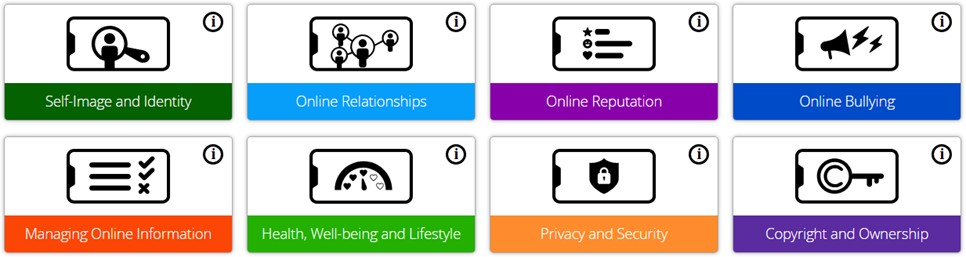
The curriculum also links with the Education for a Connected World Framework (we use Project Evolve to deliver this) to ensure a high level of online safety skills are developed and progressed throughout pupils’ time at Peel Common.
|
|
Autumn 1 |
Autumn 2 |
Spring 1 |
Spring 2 |
Summer 1 |
Summer 2 |
|
|
KS1 |
Year 1 |
1.1 Computing systems and networks – Technology around us
Project Evolve Health & Wellbeing, Privacy & Security |
1.2 Creating media – Digital painting
Project Evolve Online Reputation
|
1.3 Programming A – Moving a robot
Project Evolve Self-image & Identity
|
1.4 Data and information – Grouping data |
1.5 Creating media – Digital writing
Project Evolve Managing Information Online |
1.6 Programming B - Programming animations
Project Evolve Online Relationships |
|
Year 2 |
2.1 Computing systems and networks – IT around us
Project Evolve Privacy & Security |
2.2 Creating media – Digital photography
Project Evolve Online Reputation |
2.3 Programming A – Robot algorithms
Project Evolve Health & Wellbeing |
2.4 Data and information – Pictograms
Project Evolve Self-image & Identity |
2.5 Creating media - Digital music
Project Evolve Managing Information Online |
2.6 Programming B - Programming quizzes
Project Evolve Online Relationships |
|
|
|
Autumn 1 |
Autumn 2 |
Spring 1 |
Spring 2 |
Summer 1 |
Summer 2 |
|
|
Year 3 / 4 |
Year 3 |
3.1 Computing systems and networks: Connecting computers
Project Evolve Y3/4 Health, Wellbeing and Lifestyle |
3.2 Creating media: Stop-frame Animation
|
3.3 Programming A: Sequencing sounds
Safer Internet Day Project Evolve Y3/4 Online Bullying |
3.4 Data and information: Branching Databases
|
3.5 Creating media: Desktop publishing
Project Evolve Y3/4 Online Relationships
|
3.6 Programming B: Events and actions in programs |
|
Year 4 |
4.1 Computing systems and networks: The internet
Project Evolve Y3/4 Self-image and Identity |
4.2 Creating media: Audio production
|
4.3 Programming A: Repetition in shapes
Safer Internet Day Project Evolve Y3/4 Online Reputation |
4.4 Data and information: Data logging |
4.5 Creating media: Photo editing
Project Evolve Y3/4 Managing Online Information
|
4.6 Programming B: Repetition in games |
|
|
|
|||||||
|
|
Autumn 1 |
Autumn 2 |
Spring 1 |
Spring 2 |
Summer 1 |
Summer 2 |
|
|
Year 5 / 6 |
Year 5 |
5.1 Computing systems and networks: Systems and searching
Project Evolve Y5/6 Health, Wellbeing and Lifestyle
|
5.2 Creating media: Video production |
5.3 Programming A: Selection in physical computing
Safer Internet Day Project Evolve Y5/6 Online Bullying
|
5.4 Data and information: Flat-file databases
|
5.5 Creating media: Introduction to vector graphics
Project Evolve Y5/6 Online Relationships |
5.6 Programming B: Selection in quizzes
|
|
Year 6 |
6.1 Computing systems and networks: Communication and collaboration
Project Evolve Y5/6 Self-image and Identity |
6.2 Creating media: Webpage creation
|
6.3 Programming B: Variables in games
Safer Internet Day Project Evolve Y5 Managing Online Information
|
6.4 Data and information: Introduction to Spreadsheets |
6.5 Creating media: 3D modelling
Project Evolve Y6 Managing Online Information
|
6.6 Programming B: Sensing movement |
|
Project Evolve strands
“The Web as I envisaged it, we have not seen it yet. The future is still so much bigger than the past.”
Tim Berners-Lee, Inventor of the World Wide Web